Archive and Export
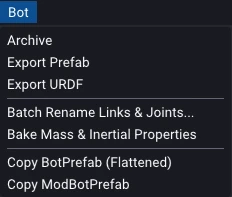
With editing, modding, and validation behind us, the last stop is getting a finished bot back out of Studio: freezing it for safekeeping, or exporting it to other formats for use elsewhere. These all live in the Bot menu on the main menu bar.
Archival
Both a Bot and a Mod Bot resolve their dependencies when they are loaded, so improvements made upstream flow through automatically. That is exactly what you want while iterating, but sometimes you want the opposite: a frozen snapshot that will not shift underneath you, so a result stays reproducible no matter what changes upstream.
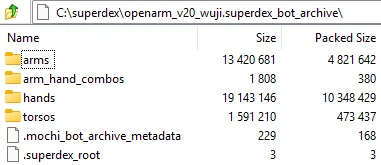
Bot > Archive, from the main menu, does this. It zips the bot together with
every asset it depends on, following its references transitively (base bots,
attached bots, referenced models, and so on), and writes a single
.superdex_bot_archive file. The archive is fully self-contained and loads
exactly like any other bot file, so you can hand it off or shelve it knowing it
will build the same way later.
Prefab Export
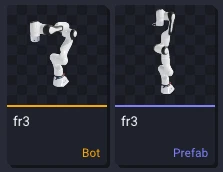
Bot > Export Prefab exports just the articulation side of a bot as a
.mochi_prefab. This is useful when something was modeled as a bot but you
later decide it should be a plain articulation, with none of the extra bot baggage.
You are left with the articulated structure on its own.
URDF Export (XML only)
Bot > Export URDF writes the bot's structure back out as a .urdf file.
This is an XML-only export: the mesh references are not converted to the formats
URDF tooling usually expects, DAE for visual meshes and STL for collision. They
keep pointing at whatever files the bot already uses, so if you plan to simulate
the exported URDF, you will need to convert those meshes offline first.
The XML still has real value for interoperating with software that expects URDF, such as ROS or Pinocchio, so SuperDex Studio remains a useful authoring tool for teams who would rather run their robots in a tool they already use.