Bots
A bot is defined declaratively according to the SuperDex Bot schema, serialized to a
.superdex_bot file (JSON) and backed by the class BotPrefab.
A loaded .superdex_bot is a complete recipe for one articulated robot: its links, joints,
default pose, and other parameters. In scope, the format is closer to URDF than
to MJCF or USD — it strictly describes a bot and only a bot, not surrounding content such
as scene or environment information.
Coordinate System and Units
The schema follows the robotics-standard convention: a right-handed coordinate system with Z up and X forward, and SI units throughout — meters for lengths, radians for angles, kilograms for mass, and seconds for time.
BotPrefab
BotPrefab is the complete parameterization of a single bot and the top-level
entry point of the schema. It closely mirrors SuperDex Physics's
ArticulatedActorPrefab and reuses its building blocks — BotJointPrefab and
BotLinkPrefab extend the engine's ArticulatedJointPrefab and
ArticulatedLinkPrefab, so the underlying articulation description is shared
rather than reinvented. It is kept as a separate type so robotics-specific
extensions — joint effort limits and link contact overrides — can be layered on
without changing the physics engine.
fields:
| Field | Type | Description |
|---|---|---|
name | string | Bot name. Typically the same name as the .superdex_bot file. |
joints | BotJointPrefab[] | Joint parameters for each joint in the articulation (see below). |
links | BotLinkPrefab[] | Link parameters for each link in the articulation (see below). |
worldFromRoot | TransformRT | Transform from the root link to the world frame. |
defaultPose (optional) | real[] | Default pose used when spawning the bot: one value per joint DOF — radians for revolute joints, meters for prismatic joints. If empty, all DOFs default to zero. |
contactOverrides (optional) | BotContactOverride[] | Link-link contact override pairs. |
cycles (optional) | ArticulatedCycleJointParams[] | Cycle-closing joints for closed-loop mechanisms (e.g. four-bar linkages, parallel grippers). |
In contrast to some conventions (e.g. URDF), joints and links arrays are always the same length — joint i is the
parent joint of link i. The first entry (index 0) is the world joint,
which attaches the root link to the world; it is typically a Free joint
(floating base) or a Hard joint (base rigidly fixed to the world).
defaultPose holds one value per actuated joint DOF. This is not the
same as SuperDex Physics's full articulation DOF count: a Free world joint
(typically index 0) contributes 6 DOFs to the physics articulation but is
excluded from defaultPose, so a floating-base robot omits those first 6
base DOFs here. Per-joint contributions:
Revolute/Prismatic— 1 value each;Spherical— 3 consecutive values (a rotation vector);Hard/Free— 0 values.
By default, a bot spawns with contact disabled between each link and its
nearest physics-bearing ancestor (i.e. adjacent, parent-child links).
contactOverrides lets you override this per link pair: disable contact
between links that are not adjacent, or re-enable it for adjacent pairs that
are implicitly disabled (set enable accordingly).
Disabling contact that isn't needed can improve performance — every enabled link pair is one more pair the engine must test for collisions each step. SuperDex Studio's bot editor provides tools to identify links which cannot contact.
BotJointPrefab
BotJointPrefab extends the engine's ArticulatedJointPrefab (a thin wrapper
over ArticulatedJointParams), adding the bots-specific effortLimit. Fields
marked (bots) are additions on top of the inherited engine fields.
| Field | Type | Description |
|---|---|---|
name | string | Joint name. Must not contain /, \, or NUL. |
type | ArticulatedJointType | Joint type: one of Free, Hard, Revolute, Prismatic, or Spherical. Defaults to the Invalid sentinel and must be set. |
parentLinkFromJoint | TransformRT | Rotation and translation of the joint with respect to the parent link. |
axis | real[3] | Local axis of motion, in the joint's local frame. Used only by Revolute/Prismatic joints (must be non-zero; auto-normalized to unit length); ignored otherwise. |
friction | ArticulatedJointFrictionParams | Joint friction parameters. Ignored for Free/Hard joints. |
inertia (optional) | real | Joint inertia coefficient — [kg] for translational DOFs, [kg·m²] for rotational DOFs. Default 0; ignored for Free/Hard joints. |
minLimit (optional) | real[3] | Minimum joint limit per DOF — [m] for translational, [rad] for rotational. For 1D joints, the scalar limit times the joint axis. |
maxLimit (optional) | real[3] | Maximum joint limit per DOF — [m] for translational, [rad] for rotational. For 1D joints, the scalar limit times the joint axis. |
limitStiffness | real | Stiffness of the joint-limit constraints [N/m or N·m/rad] (default 100). Ignored for joints without limits. |
limitDamping | real | Damping of the joint-limit constraints [N·s/m or N·m·s/rad] (default 0). Ignored for joints without limits. |
effortLimit | real | (bots) Max actuation effort — [N·m] revolute, [N] prismatic. Advisory metadata read by controllers, not enforced by the sim. Negative = unbounded, 0 = non-actuated. |
Joint names must be unique among joints, link names unique among links, and no joint and link may share the same name — every joint and link in a bot is identified by a name that is unique across both.
BotLinkPrefab
BotLinkPrefab extends the engine's ArticulatedLinkPrefab (which wraps
ArticulatedLinkParams and swaps the runtime shape handle for serializable file
paths), adding per-link sensors. Fields marked (bots) are additions on top
of the inherited engine fields.
| Field | Type | Description |
|---|---|---|
name | string | Link name. Must not contain /, \, or NUL. |
parentLink | int | Index of the parent link in links, or -1 for the root. Links are listed parent-first (parentLink < i). |
parentJointFromLink | TransformRT | Rotation and translation of the link with respect to the parent joint. The rotation must be identity (non-identity rotations are not yet supported). |
layer (optional) | string | Collision layer name for filtering contacts between link actors. Defaults to empty. |
colliderType | ColliderType | Collision-detection geometry — determines how other actors detect contact with this link (default Auto). |
contact | ContactParams | Contact-mechanics parameters. |
hasGravity | bool | Whether the link is affected by gravity (default true). |
density (optional) | real | Uniform density [kg/m³] (positive). Specify either density or mass; if neither, the default 1000 kg/m³ is used. |
mass (optional) | real | Total mass [kg] (positive). Specify either mass or density. |
centerOfMass (optional) | real[3] | Center of mass [m] in the link's local frame. If unset, computed from geometry. |
momentOfInertia (optional) | real[6] | Moment of inertia [kg·m²] at the center of mass, stored [ixx, ixy, ixz, iyy, iyz, izz] in negative-tensor notation (consistent with URDF). |
shapeFile (optional) | string | Path to a model file defining the link's collision geometry. Leave empty for dummy links. |
shapeScale / shapeRotation / shapeTranslation | real[3] / Quaternion / real[3] | Scale, rotation [x, y, z, w], and translation [m] baked into the collision shape at runtime. |
renderModelFile (optional) | string | Path to the render mesh. |
renderModelScale / renderModelRotation / renderModelTranslation | real[3] / Quaternion / real[3] | Scale, rotation [x, y, z, w], and translation [m] applied to the render mesh. |
sensors (optional) | BotSensorPrefab[] | (bots) Sensors attached to this link. May be empty. |
Link names must be unique among links, joint names unique among joints, and no link and joint may share the same name — every link and joint in a bot is identified by a name that is unique across both.
For links with geometry (shapeFile set), the inertial fields must form one
of these combinations — any other combination is rejected:
- none set — mass, center of mass, and inertia are all derived from the geometry (using the default density of
1000 kg/m³); densityonly — mass, center of mass, and inertia are derived from the geometry at that density;massonly — center of mass and inertia are derived from the geometry, scaled to the given mass;mass+centerOfMass+momentOfInertia— fully explicit inertial properties;density+centerOfMass+momentOfInertia— explicit center of mass and inertia, with mass derived fromdensityand the geometry.
density and mass are mutually exclusive, and centerOfMass and
momentOfInertia must be given together (never one without the other). When
provided, density and mass must be positive and finite. Links without
geometry (no shapeFile, e.g. frames or tool tips) carry no mass properties.
Meshes
Each link references up to two independent meshes: a collision mesh
(shapeFile) that the physics engine simulates against, and a render mesh
(renderModelFile) used only for visualization.
Collision Mesh
The canonical, preferred collision asset is a SuperDex Physics ModelData /
Shape serialized as .mochi.h5 (binary) or .mochi.json (text) — a mesh with a
pre-baked signed distance field (SDF) for accurate, high-quality contact. These
are best produced from raw visual assets or CAD STEP files with
SuperDex Studio, which handles remeshing,
offline SDF baking, and validation.
Raw mesh formats are also supported directly — .stl, .obj, .ply, and
.off — in which case an SDF collider is baked on the fly at bot-creation time.
This is convenient for prototyping (e.g. loading straight from a URDF), but for
production assets the preprocessed .mochi.h5 / .mochi.json path is strongly
preferred.
Render Mesh
The render mesh has no bearing on the physics simulation; its format is
essentially arbitrary and dictated by the visualization endpoint being
integrated with. SuperDex Robotics, SuperDex Studio, and other SuperDex
integrations standardize on glTF Binary (.glb)
because it carries a standard physically-based rendering (PBR) material model —
in contrast to the Collada (.dae) meshes URDF conventionally uses.
Keep mesh assets in collision/ and render/ folders adjacent to the
.superdex_bot file, and reference them with relative paths (e.g.
collision/fr3_link0_collision.mochi.h5, render/fr3_link0_render.glb). This is
the convention the shipped assets and SuperDex Studio's exporter follow.
Example .superdex_bot File
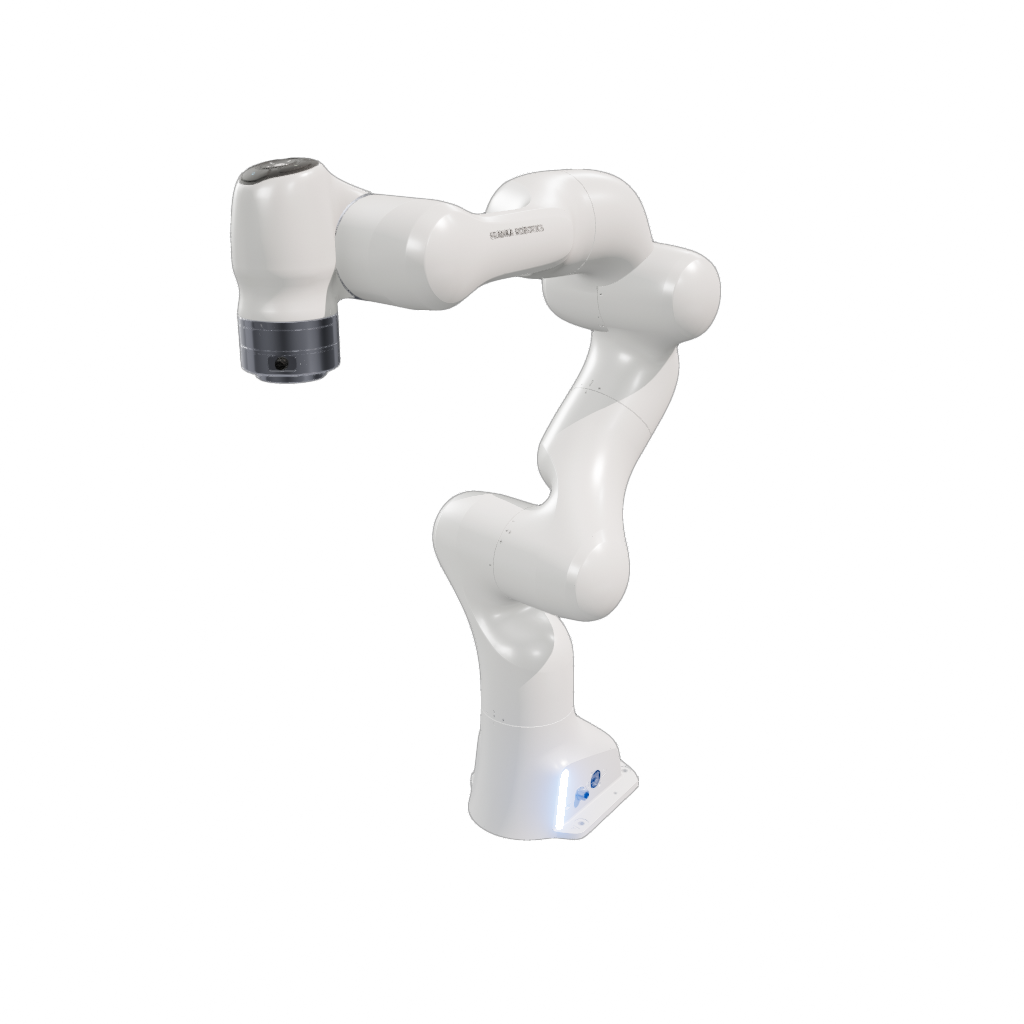
The shipped FR3 arm (assets/bots/arms/fr3_v2/fr3_v2.superdex_bot) is a 7-DoF
arm with Hard world/base/flange joints, Revolute actuated joints (with
limits, friction, and inertia), and per-link mass properties, collision meshes,
and render meshes. Abbreviated below (later joints and links elided):
{
  "defaultPose": [0, -0.785, 0, -2.36, 0, 1.57, 1.57],
  "joints": [
    {
      "maxLimit": [0, 0, 0],
      "minLimit": [0, 0, 0],
      "name": "world_joint",
      "type": "Hard"
    },
    {
      "maxLimit": [0, 0, 0],
      "minLimit": [0, 0, 0],
      "name": "fr3_base_joint",
      "type": "Hard"
    },
    ...
  ],
  "links": [
    {
      "centerOfMass": [0, 0, 0],
      "mass": 0,
      "momentOfInertia": [0, 0, 0, 0, 0, 0],
      "name": "base"
    },
    {
      "centerOfMass": [-0.0172, 0.0004, 0.0745],
      "mass": 2.40,
      "momentOfInertia": [0.009, 0, 0.002, 0.0115, 0, 0.0085],
      "name": "fr3_link0",
      "parentLink": 0,
      "renderModel": "render/fr3_link0_render.glb",
      "shape": "collision/fr3_link0_collision.mochi.h5"
    },
    ...
  ],
  "name": "fr3_v2"
}
The FR3 arm this file describes, loaded and simulated:
Loading a .superdex_bot
Load a .superdex_bot (or a .superdex_bot_archive, which is transparently
extracted and cached), inspect it, and instantiate it in a physics scene:
import superdex.physics as physics
import superdex.robotics as robotics
from superdex.physics.paths import resolve_asset

# Create a physics scene to instantiate the bot into.
scene = physics.create_scene("Bot Loading Example")

# Load the bot prefab from a .superdex_bot file.
bot_prefab = robotics.load_bot_prefab_from_file(
    str(resolve_asset("bots/arms/fr3_v2/fr3_v2.superdex_bot"))
)

# Print the bot's name.
print(bot_prefab.name)

# Create a RoboticsContext, which owns the bot's controllers and sensors.
bots_context = robotics.create_context()

# Instantiate the bot in the scene: builds its articulated actor and seeds the default pose.
bot = robotics.create_bot(scene, bot_prefab, bots_context)
A .superdex_bot file may instead encode a ModBotPrefab — a modification
recipe layered on top of a base bot. The loader
resolves these automatically, compiling the final
BotPrefab before returning it. See Modifying Bots.
load_bot_prefab_from_file also accepts a .superdex_bot_archive (a
self-contained zip of a bot and all its referenced assets), which it
transparently extracts and caches before loading.
Loading from a URDF
A robot can also be loaded directly from a raw .urdf at runtime, with no
preprocessing step — handy for quick prototyping or trying a third-party robot
description:
# Parse a URDF into a BotPrefab. Collision meshes (.stl) are loaded
# directly and an SDF collider is baked on the fly at create time.
bot_prefab = robotics.load_bot_prefab_from_urdf_file("path/to/robot.urdf")

# The URDF loader injects a Free world joint at index 0, so the base would
# free-fall. Switch it to a Hard weld to anchor the base to the world.
bot_prefab.joints[0].type = physics.ArticulatedJointType.HARD

bot = robotics.create_bot(scene, bot_prefab, bots_context)
- Only
<mesh>geometry is imported; primitive collision shapes (<box>,<cylinder>,<sphere>) are silently ignored. - The base is imported as a
Freejoint at index0. Anchor it with aHardjoint (as above) unless you actually want a floating base. - Colliders are baked on the fly, which is convenient but lower quality than preprocessed assets (no offline remeshing or SDF validation).
For anything beyond prototyping, import URDFs through
SuperDex Studio instead. Studio remeshes
collision geometry, bakes
watertight SDFs offline, validates parameters, and emits a self-contained
.superdex_bot with preprocessed .glb and .mochi.h5 assets — which you then
load with load_bot_prefab_from_file like any other bot.
Runtime Interface
The example above loaded a bot into the scene and got back a Bot — the runtime
handle to the live bot. Where BotPrefab is the static, on-disk description,
Bot is the instantiated object: use it to dig into the underlying physics
articulation, create and drive components, and query the bot's identity. It
does not own scene resources beyond its actor; destroy it with
destroy_bot(scene, bot) (or let the RoboticsContext clean it up).
Key accessors on Bot:
| Method | Returns | Purpose |
|---|---|---|
get_name() | string | The bot's name (from BotPrefab.name). |
get_bot_prefab() | BotPrefab | The prefab this bot was compiled from. |
get_articulated_actor() | Actor | The underlying articulated physics actor — pose, DOFs, contact queries, etc. |
get_scene() | Scene | The scene the bot lives in. |
create_controller(type, name="") | Controller | Create and attach a controller (e.g. "BASIC_OSC_PD"); keep the returned object to drive it. |
create_sensor(type, link_name, name="", param_args="") | Sensor | Attach a sensor to a named link at runtime, as if it had been declared in the prefab. |
create_actuator(type, link_name, name="", param_args="") | Actuator | The actuator equivalent of create_sensor. |
get_sensor_handles() / get_actuator_handles() | handle list | Every sensor / actuator this bot created, prefab-declared or added later. |
get_sensor(handle) / get_actuator(handle) | Sensor / Actuator | Resolve one of this bot's handles to the live component. |
get_sensor_link_name(handle) / get_actuator_link_name(handle) | string | The link a component is attached to. |
find_controllers_by_type(type) / find_controllers_by_name(name) | handle list | Every match on this bot. Sensor and actuator equivalents exist too. |
There is no get_controller(type) — a bot may hold several controllers of the
same type, so controllers are looked up with the find-by-type / by-name API,
which returns the handles of every match; resolve each with
RoboticsContext.get_controller(handle). The bot-scoped finders search only that
bot; the RoboticsContext ones of the same name search the whole context. See
Controllers, Sensors & Actuators and
Bot Context & Lifetime.
Continuing the example from the previous section:
# The runtime bot exposes the underlying physics articulation...
actor = bot.get_articulated_actor()
print("DOFs:", actor.get_num_dofs())

# ...and lets you attach controllers to drive it (see the Bot Controllers guide).
# The optional second argument names the instance for later find_* lookups.
osc = bot.create_controller("BASIC_OSC_PD", "arm_osc")
See Also
- Controllers, Sensors & Actuators — create and drive controllers, sensors and actuators.
- Modifying Bots — compose a new bot from a base bot and other bots.
- Bot Assets — the
.superdex_botassets we ship.