Rendering
SuperDex Gym environments use superdex.physics.viewer.Viewer, the SuperDex
Physics viewer built on Polyscope, for interactive
debugging, evaluation, and programmatic video generation. SuperDex Gym
instantiates and drives the viewer; rendering lives in superdex-physics.
Before You Render
Check Platform and Headless Constraints
Polyscope rendering needs polyscope>=2.5.0,<2.6, declared by
superdex-physics. Availability is a feature probe, not a version parse: the
viewer checks for polyscope.get_ui_scale. When the probe fails,
superdex.physics.viewer.VIEWER_AVAILABLE is False, and the scripts fall back
to headless operation. See
Requirements and Failure Modes.
Linux, macOS, and Windows follow the same code path; the viewer has no platform
gate. A usable GL/EGL context is required for Polyscope, including on headless
hosts. Forked subprocesses can deadlock with multithreaded simulation and can
segfault when Ray Tune initializes rendering. HybridVectorEnv forces the spawn
start method, so each spawned worker can create a context, but rendering more than
one environment per process is unsupported.
Choose a Render Mode
The render_mode environment configuration accepts:
"human": Interactive visualization in a GUI window, recommended for debugging.reset()andstep()callrender()automatically."rgb_array": Offscreen rendering for programmatic access and video generation. Callenv.render()explicitly for each frame.None: No renderer. This is the default and the mode for training.
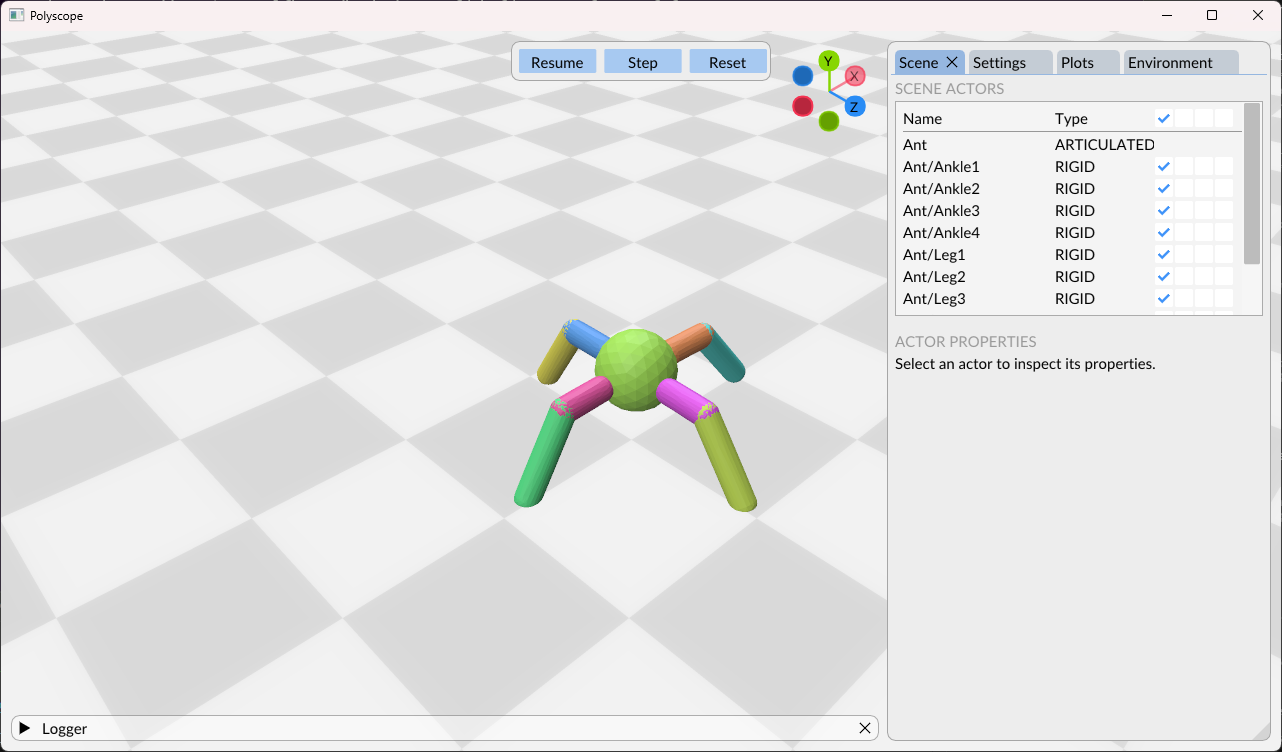
Interactive and Offscreen Rendering
These configurations use the Polyscope renderer. Choose one when creating
an environment: "human" requires a GUI-capable GL context, "rgb_array" requires
explicit env.render() calls, and None creates no renderer.
from superdex.lab.gym.envs.benchmarks.cartpole_env import CartPoleEnv

# Interactive visualization (opens a GUI window)
human_config = {
    "render_mode": "human",
    "render_size": (1280, 720),  # Optional: set window size
    "start_paused": False,       # Optional: start simulation paused
}

# Offscreen rendering (for video generation)
video_config = {
    "render_mode": "rgb_array",
    "render_size": (1920, 1080),  # Video resolution
}

# No rendering (training mode)
training_config = {
    "render_mode": None,  # Maximum performance
}

env = CartPoleEnv(human_config)
env.close()
Producing Videos
Use render_mode="rgb_array", call env.render() for every captured frame, and
save the frames with AnimationWriter.
AnimationWriter encodes MP4 files on a background thread through ImageIO. Without
the FFmpeg plugin, encoding can fail without making write() or flush() raise,
leaving a truncated file. Verify that import imageio_ffmpeg succeeds; otherwise,
install imageio[ffmpeg]. See Installation and Setup.
Basic Video Recording
import pathlib

from superdex.physics.viewer.utils import AnimationWriter

# Setup environment for video recording
env_config = {
    "render_mode": "rgb_array",
    "render_size": (1920, 1080),  # HD video resolution
}

env = YourEnv(env_config)
writer = AnimationWriter(
    output_path=pathlib.Path("./videos/"),
    fps=30,  # Match your desired video framerate
    fmt="mp4",
)

# Record episode
obs, _ = env.reset()
for step in range(1000):
    action = env.action_space.sample()  # Substitute your policy here.
    obs, reward, terminated, truncated, info = env.step(action)

    # Capture an RGB frame.
    frame = env.render()
    writer.add(frame)

    if terminated or truncated:
        break

# Save video
writer.write("my_episode")  # Creates "my_episode.mp4"
writer.flush()  # Wait for file to be written
env.close()
Recording Multiple Episodes Sequentially
This example still records one rendered environment per process; it records the episodes sequentially.
def record_multiple_episodes(env_config, num_episodes=10):
    env = YourEnv(env_config)
    writer = AnimationWriter(
        output_path=pathlib.Path("./evaluation_videos/"),
        fps=30,
        fmt="mp4",
    )

    for episode in range(num_episodes):
        obs, _ = env.reset()
        episode_frames = []

        while True:
            action = env.action_space.sample()  # Substitute your policy here.
            obs, reward, terminated, truncated, info = env.step(action)

            frame = env.render()
            episode_frames.append(frame)

            if terminated or truncated:
                break

        # Add all frames for this episode
        writer.add(episode_frames)
        writer.write(f"episode_{episode:03d}")

    writer.flush()
    env.close()
Configuring the Coordinate System
Set MochiEnvCfg.render_coordinate_system when assets or data use a coordinate
convention different from the default Polyscope convention.
Available Coordinate Systems
| Preset Name | Handedness | Up Axis | Forward Axis | Used By / Convention | Axis Mapping |
|---|---|---|---|---|---|
"polyscope" or None | Right-handed | Y | -Z | OpenGL, Polyscope (default) | Right = +X, Up = +Y, Forward = -Z |
"blender" | Right-handed | Z | Y | Blender | Right = +X, Up = +Z, Forward = +Y |
"unity" | Left-handed | Y | Z | Unity | Right = +X, Up = +Y, Forward = +Z |
"unreal" | Left-handed | Z | X | Unreal Engine | Right = +Y, Up = +Z, Forward = +X |
"mochi" | Right-handed | Y | -Z | SuperDex Physics engine | Right = +X, Up = +Y, Forward = -Z |
"ros" | Right-handed | Z | X | ROS (Robot Operating System) | Right = -Y, Up = +Z, Forward = +X |
Using Preset Coordinate Systems
Pass a preset name as a string:
from superdex.lab.gym.envs.benchmarks.cartpole_env import CartPoleEnv

# Use Unity coordinate system
env = CartPoleEnv({
    "render_mode": "human",
    "render_coordinate_system": "unity",
})

# Use Unreal coordinate system
env = CartPoleEnv({
    "render_mode": "human",
    "render_coordinate_system": "unreal",
})
Custom Coordinate Systems
Pass a CoordinateSystem for a custom convention:
from superdex.lab.gym.envs.benchmarks.cartpole_env import CartPoleEnv
from superdex.physics.utils.coordinate_systems import CoordinateSystem

# Define a custom coordinate system
custom_system = CoordinateSystem(right="+X", up="+Z", forward="-Y")

env = CartPoleEnv({
    "render_mode": "human",
    "render_coordinate_system": custom_system,
})
Default Behavior
If render_coordinate_system is not specified or is None, the renderer uses
the legacy OpenGL coordinate system, which matches Polyscope's internal
convention. No coordinate transformations are applied.
Configuring Default Render Items
SuperDex Gym renders scene actors with mesh geometry by default.
What Gets Rendered by Default
- All Actor Types: Rigid bodies, articulated actors, and soft actors are automatically included.
- Surface Meshes: Solid surfaces are the primary visual representation.
The Polyscope viewer draws an actor when any of these conditions holds:
- It has a registered GLB visual model.
- Its
get_surface_mesh()is non-empty. - It is a static infinite-plane collider. A dedicated
StaticPlaneRendererdraws these actors despite an empty surface mesh, which is how ground planes appear.
Default Rendering Settings
Solid mesh surfaces are shown. Wireframe edges, individual mesh vertices, and coordinate-frame axes are off unless enabled. Each toggle gets its initial state when the Polyscope structure is constructed; the Scene panel on the first frame is authoritative for a given build.
Interactive Configuration
This UI is available in render_mode="human":
- Scene Panel: Toggle surface, edges, nodes, and axes for each actor.
- Batch Controls: Apply visibility changes to all actors simultaneously.
- Actor Selection: Click actors to inspect and modify individual settings.
Configuring Through Code
Excluding Actors from Rendering
from superdex.lab.gym.envs import MochiEnv


class MyCustomEnv(MochiEnv):
    def _reset_renderer(self):
        # Exclude specific actors by name or pattern
        self._renderer.set_excluded_actors([
            "GroundPlane",      # Exclude by exact name
            "Debug_*",          # Exclude using wildcard patterns
            "Sensor*",          # Hide all sensor-related actors
        ])
Configuring Default Display Options
get_actor_renderers() returns ActorRenderer and StaticPlaneRenderer
objects.
StaticPlaneRenderer overrides set_enable_edges, set_enable_axes,
set_enable_nodes, and set_show_axes_at_com as no-ops. It does not implement
set_transparency; calling that method on a ground-plane renderer raises
AttributeError.
set_show_axes_at_com does not stickWhether axes are drawn at the origin or at the centre of mass is a global
viewer setting. The viewer rewrites every actor renderer from it each frame, so
a per-actor set_show_axes_at_com(...) call is overwritten before it is drawn.
Toggle it in the viewer UI instead.
from superdex.lab.gym.envs import MochiEnv


class MyCustomEnv(MochiEnv):
    def _reset_renderer(self):
        # Get all actor renderers
        actor_renderers = self._renderer.get_actor_renderers()

        # Configure rendering for all actors
        for actor_renderer in actor_renderers:
            # Enable wireframe edges for debugging
            actor_renderer.set_enable_edges(True)

            # Show coordinate axes
            actor_renderer.set_enable_axes(True)

            # Enable vertex visualization for soft bodies
            if "Soft" in actor_renderer.get_name():
                actor_renderer.set_enable_nodes(True)
Per-Actor Configuration
Do not call set_transparency() on a StaticPlaneRenderer.
from superdex.physics.utils.scene_helpers import find_actor
from superdex.lab.gym.envs import MochiEnv


class MyCustomEnv(MochiEnv):
    def _update_renderer(self):
        if self._renderer is None:
            return

        # Configure specific actors individually
        robot_actor = find_actor(self._scene, "Robot")
        robot_renderer = self._renderer.get_actor_renderer(robot_actor)
        if robot_renderer:
            # Show robot coordinate frames
            robot_renderer.set_enable_axes(True)
            # Do not call set_show_axes_at_com here - see the note above; the
            # viewer rewrites it from the global setting every frame.

        # Make debugging objects semi-transparent
        debug_actor = find_actor(self._scene, "DebugObject")
        debug_renderer = self._renderer.get_actor_renderer(debug_actor)
        if debug_renderer:
            debug_renderer.set_transparency(0.5)
Adding Custom Render Items
Custom environments can add visualization elements to aid understanding and debugging by overriding renderer hooks.
When the Hooks Run
render() runs _reset_renderer() when the render scene is dirty, then runs
_update_renderer().
- In
"human"mode,reset()andstep()callrender()automatically._update_renderer()runs once per step, and_reset_renderer()runs once per episode during therender()triggered byreset(). - In
"rgb_array"mode,reset()marks the render scene dirty, but neither hook runs until you callenv.render(). - With
render_mode=None, no renderer exists and neither hook runs. Do not put simulation-relevant state in these hooks.
Available Renderer Methods
_reset_renderer()
Use this hook for visualization setup that changes only between episodes. It
runs on the first render() after each reset(); in "human" mode, that
render() occurs inside reset().
_update_renderer()
Use this hook for dynamic visualization that changes each frame. It runs during
every render() call, immediately before the frame is produced.
Example: Adding Custom Visualizations
import numpy as np
from superdex.lab.gym.envs.mochi_env import MochiEnv

class MyCustomEnv(MochiEnv):
    def _reset_renderer(self):
        """Called on the first render() after each reset - static visualizations."""
        if self._renderer is None:
            return

        # Add a reference grid
        self._renderer.add_grid(
            name="Floor",
            size=10.0,
            center=np.array([0, 0, 0]),
            period=1.0,
            axes="xz",
        )

        # Set camera view
        self._renderer.set_camera_view(
            look_from=np.array([5, 3, 5]),
            look_at=np.array([0, 1, 0]),
        )

        # Enable follow camera for dynamic scenes
        self._renderer.set_enable_follow_camera(True)
        self._renderer.set_follow_camera_smoothness(0.8)

    def _update_renderer(self):
        """Called at the end of every render() - add dynamic visualizations."""
        if self._renderer is None:
            return

        # Example: Visualize force vectors, targets, etc.
        # This is where you'd add step-by-step visual debugging

        # Frame the scene to keep objects in view
        if self.get_step_count() == 0:
            self._renderer.frame_scene()
add_grid Arguments
Pass add_grid options by keyword. Its signature is:
add_grid(name, size=np.inf, center=None, period=1, axes="xz", style="checker",
         color_1=(0.9, 0.9, 0.9), color_2=(1, 1, 1), double_sided=False)
double_sided is the ninth positional parameter, after the two colours. axes
is one of "xy", "xz", or "yz"; style is "grid" or "checker".
Advanced Renderer Features
from superdex.lab.gym.envs import MochiEnv


class MyCustomEnv(MochiEnv):
    def _reset_renderer(self):
        if self._renderer is None:
            return

        # Add multiple grids with different styles
        self._renderer.add_grid("XY_Plane", axes="xy", style="checker")
        self._renderer.add_grid("Ground", axes="xz", style="grid")

        # Camera controls
        self._renderer.set_enable_follow_camera(True)
        self._renderer.set_compute_automatic_distance(True)

        # Get renderer information
        actors = self._renderer.get_actors()
        scene_bounds = self._renderer.get_scene_bounds()
Performance Considerations
- Training: Use
render_mode=Nonefor maximum performance. - Evaluation: Use
"human"for interactive debugging and"rgb_array"for video generation. - Memory: High-resolution rendering uses significant GPU/CPU resources.
- Batch Training: Rendering more than one environment per process is
unsupported, not merely slow. Keep
render_mode=NonewithHybridVectorEnv.
Requirements and Failure Modes
Polyscope rendering requires polyscope>=2.5.0,<2.6, declared by
superdex-physics. superdex.physics.viewer.VIEWER_AVAILABLE reports a feature
probe rather than a version parse: it is True when polyscope imports and
exposes get_ui_scale. Constructing a viewer without it raises:
RuntimeError: Failed to initialize the renderer. Polyscope is not installed in the current environment, or it's an incompatible version. Please install Polyscope >= 2.5.0 to enable the renderer.
Callers handle an unavailable viewer differently:
run_sample.pywarns and falls back torender_mode=None, dropping any video request.run_inference.pydoes the same for asuperdex_gym/*checkpoint, printsRenderer not available, setting render mode to None..., and records nothing.- For RLlib,
train_samples.pywarns and skips attachingCheckpointVideoGeneratorCallback. Checkpoint video generation is disabled, not made headless. The callback never checks the flag; when it runs, it forcesrender_mode="rgb_array"unconditionally.
For platform behavior, GL/EGL context requirements, and forked versus spawned workers, see Check Platform and Headless Constraints.