Custom Components
Defines custom controller, sensor, and actuator classes in Python and closes
a sensing–control–actuation loop on a simple 2-DOF planar arm
(example_bot_2dof.superdex_bot).
- The sensor approximates a simple 3-axis contact force sensor.
- The controller follows a task-space trajectory but switches the vertical axis to force control upon sensed contact.
- The actuator is a simple model of a velocity-controlled servo motor.
Source: examples/advanced/example_custom_components.py
Key Concepts
This example shows how custom sensor and actuator classes can be defined and
encoded into the .superdex_bot definition attached to their respective links.
When the script registers the type names, the corresponding sensor and actuator
classes are instantiated by create_bot() and accessible to the simulation.
Controllers are not encoded in .superdex_bot files, so the controller is
created in code.
A prefab scene containing a deformable object prop is also loaded to provide a target for robot-environment contact.
Constants and naming
Sensors and actuators defined and auto-instantiated by the SuperDex bot are
referenced by name. Hence, name constants in the script must match what the
.superdex_bot declares. The force sensor reads contact force on the
end-effector link (index 3) of the example planar 2-DOF arm and references the
link by index.
END_EFFECTOR_LINK_INDEX = 3
SENSOR_NAME = "force_sensor"
ACTUATOR_NAMES = ("servo_1", "servo_2")
The controller: MyVelocityForceController
The custom controller implements a 2D task-space velocity controller that switches to a force controller along the vertical (Z) axis upon contact. In velocity mode, it applies a P control law:
v_des = x_dot_target + k_p * (x_target - x) [k_p in 1/s]
Force mode replaces the Z row with an admittance law:
v_z = k_f * (f_z - f_z_target) [k_f in (m/s)/N]
The desired task-space velocity is mapped to joint velocities by
q_dot_des = pinv(J_eff) @ v_eff, where J_eff is the planar X-Z slice of the
translation Jacobian (2×2 for this arm). f_z_target is both the entry
threshold and the regulated setpoint. Force mode is entered when measured f_z
exceeds the target and left when the target clears the end-effector by
exit_margin or contact is lost:
class MyVelocityForceController:
    def __init__(self, actor):
        self.actor = actor
        self.k_p: float = 5.0  # 1/s
        self.k_f: float = 0.05  # (m/s)/N
        self.f_z_target: float = 0.5  # N
        self.exit_margin: float = 0.005  # m
        self.force_mode: bool = False

    def reset(self) -> None:
        self.force_mode = False
Observations are sampled from the simulation. End-effector pose is obtained via
get_articulated_link_transforms and the full 6-DOF geometric Jacobian, needed
for task-space control, via get_articulated_jacobian ([6, num_dofs]
row-major; rows 0–2 linear, 3–5 angular).
def get_current_observations(self) -> dict[str, np.ndarray]:
    if self.actor is None:
        return None
    link_actor = get_link_actor(self.actor, END_EFFECTOR_LINK_INDEX)
    xforms = physics.DynamicArrayTransformRT(4)
    self.actor.get_articulated_link_transforms(xforms)
    x = np.array(xforms[END_EFFECTOR_LINK_INDEX].translation, dtype=np_real)
    num_dofs = self.actor.get_num_dofs()
    jacobian = np.array(link_actor.get_articulated_jacobian(), dtype=np_real)
    J_pos = jacobian.reshape(6, num_dofs)[0:3, :]
    return {"x": x, "J_pos": J_pos}
The core control laws are implemented in compute_output. It computes tracking
error, toggles vertical-axis control mode when entry or exit conditions are met,
and builds the desired task-space velocity in the X-Z plane, which is projected
into the robot's joint space via pseudo-inverse of the Jacobian.
def compute_output(self, obsv: dict, target: dict) -> np.ndarray:
    x_target = np.asarray(target["x"], dtype=np.float64)
    x_dot_target = np.asarray(target.get("x_dot", np.zeros(3)), dtype=np.float64)
    x = np.asarray(obsv["x"], dtype=np.float64)
    J_pos = np.asarray(obsv["J_pos"], dtype=np.float64)
    v_des = x_dot_target + self.k_p * (x_target - x)
    f_z = float(np.asarray(obsv["f_contact"])[2])
    self._update_mode(f_z, float(x_target[2]), float(x[2]))
    if self.force_mode:
        v_des[2] = self.k_f * (f_z - self.f_z_target)
    J_eff = J_pos[[0, 2], :]
    q_dot_des = np.linalg.pinv(J_eff) @ v_des[[0, 2]]
    return np.asarray(q_dot_des).reshape(-1)

def _update_mode(self, f_z: float, x_target_z: float, x_z: float) -> None:
    if not self.force_mode:
        self.force_mode = f_z > self.f_z_target
    elif x_target_z > x_z + self.exit_margin or f_z <= 0.0:
        self.force_mode = False
The sensor: MyContactForceSensor
This simple and idealized model of a contact force sensor reports the total contact force applied to the link by everything touching it, in world frame. Pressing down on a surface reads positive in Z. The query must be registered up front and is only valid after a simulation step:
class MyContactForceSensor:
    def __init__(self, actor, param_args: str):
        self.actor = actor
        if actor is not None:
            actor.register_query(physics.QueryType.TOTAL_CONTACT_FORCE)

    def reset(self) -> None:
        pass

    def compute_signal(self) -> np.ndarray:
        """World-frame contact force [N]. Call only after scene.step()."""
        return np.array(self.actor.get_contact_force_world(), dtype=np_real)
The factory signature (actor, param_args) matches the C++ sensor constructor;
this sensor has nothing to configure so it ignores param_args. An actor-less
sensor would receive None.
The actuator: MyVelocityServoActuator
The custom actuator in this example emulates the behavior of a
velocity-controlled servo motor. It implements an internal velocity-mode PI servo
that computes an output torque in Nm units that is clamped to effort_limit,
which specifies the nominal torque that corresponds to 100% PWM:
effort = k_p * e + k_i * integral(e), e = w_traj - w_present
w_traj ramps toward the commanded velocity at a rate specified by
profile_accel (0 = no smoothing). Anti-windup is by clamping: the integrator
only commits when unsaturated or when the error would pull it back out of
saturation:
class MyVelocityServoActuator:
    def __init__(self, actor, param_args: str):
        assert actor is not None, "MyVelocityServoActuator requires a link actor"
        self.actor = actor
        self.bot_actor, self.dof_index = resolve_link_dof(actor)
        text = param_args.strip()
        if not text:
            params = {}
        else:
            source = text if text.startswith("{") else Path(text).read_text()
            params = json.loads(source)
        self.k_p: float = float(params.get("k_p", 1.0))  # N*m/(rad/s)
        self.k_i: float = float(params.get("k_i", 0.3))  # N*m/rad
        self.effort_limit: float = float(params.get("effort_limit", 1.0))  # N*m
        self.profile_accel: float = float(params.get("profile_accel", 0.0))  # rad/s^2
        self._integral: float = 0.0
        self._w_traj: float = 0.0

    def reset(self) -> None:
        self._integral = 0.0
        self._w_traj = 0.0
The .superdex_bot supplies param_args as inline JSON; the framework also
allows a path to a JSON file or empty to take defaults. Each step samples the
joint's measured velocity and computes an actuator output torque using the
internal PI control law:
def get_current_observations(self) -> dict[str, float]:
    num_dofs = self.bot_actor.get_num_dofs()
    q_dot = np.zeros(num_dofs, dtype=np_real)
    self.bot_actor.get_articulated_joint_velocities(out_velocities=q_dot)
    return {"w_present": float(q_dot[self.dof_index]), "w_traj": float(self._w_traj)}

def compute_effort(self, obsv: dict, w_goal: float, dt: float) -> float:
    w_present = float(obsv["w_present"])
    self._w_traj = self._ramp_toward(float(w_goal), dt)
    e = self._w_traj - w_present
    integral_next = self._integral + e * dt
    effort_unsat = self.k_p * e + self.k_i * integral_next
    effort = float(np.clip(effort_unsat, -self.effort_limit, self.effort_limit))
    if effort == effort_unsat or e * effort_unsat < 0:
        self._integral = integral_next
    return effort

def _ramp_toward(self, goal: float, dt: float) -> float:
    if self.profile_accel <= 0:
        return goal
    max_step = self.profile_accel * dt
    return self._w_traj + float(np.clip(goal - self._w_traj, -max_step, max_step))
The trajectory
The task-space target trajectory, a circle in the X-Z plane with center (-0.3, 0.15) m and radius 0.08 m over a period of 3 seconds, is generated via a helper function:
def compute_trajectory_target(t: float) -> dict[str, np.ndarray]:
    center = np.array([-0.3, 0.0, 0.15])
    radius = 0.08
    omega = 2 * math.pi / 3.0
    theta = omega * t
    return {
        "x": center + radius * np.array([math.cos(theta), 0.0, math.sin(theta)]),
        "x_dot": radius * omega * np.array([-math.sin(theta), 0.0, math.cos(theta)]),
    }
Registering types and loading the bot
Since our sensors and actuators are encoded in the .superdex_bot file, we must
register our custom component types with the SuperDex robotics context before
create_bot is called so that it can instantiate the correct types. Names are
global to the robotics context.
def register_component_types(robotics_context) -> None:
    robotics.register_python_controller(
        robotics_context, "MY_VELOCITY_FORCE_CONTROLLER", MyVelocityForceController
    )
    robotics.register_python_sensor(
        robotics_context, "MY_CONTACT_FORCE_SENSOR", MyContactForceSensor
    )
    robotics.register_python_actuator(
        robotics_context, "MY_VELOCITY_SERVO_ACTUATOR", MyVelocityServoActuator
    )
Initializing the engine and scene follows the same pattern as the other examples. SuperDex robots are Z-up, so gravity points down -Z:
physics.initialize(num_worker_threads=0)

scene = physics.create_scene("Custom Components Example")
scene.set_gravity([0, 0, -9.81])

bot_prefab = robotics.load_bot_prefab_from_file(get_default_bot_path())

robotics_context = robotics.create_context()
register_component_types(robotics_context)
bot = robotics.create_bot(scene, bot_prefab, robotics_context)
bot_actor = bot.get_articulated_actor()

plane_shape = physics.create_plane_shape(normal=[0, 0, 1], distance=0)
scene.create_rigid_actor(name="ground", shape=plane_shape, is_static=True)

physics.prefab.add_to_scene(
    prefab_path=str(resolve_asset(DUCK_LAMP_ASSET)),
    root_path=str(get_assets_root()),
    scene=scene,
    params=physics.prefab.PrefabParams(name="duck_lamp"),
)
Controllers are not encoded in the .superdex_bot definitions, and hence our
custom controller is created in code. The sensor and actuators already exist on
the bot instance, and we look them up by the names declared in the bot file:
handle = robotics_context.create_controller(
    "MY_VELOCITY_FORCE_CONTROLLER", None, bot_actor, "my_controller"
)
controller = robotics.get_python_controller(robotics_context, handle)

sensor = robotics.get_python_sensor(
    robotics_context,
    _one_handle(bot.find_sensors_by_name(SENSOR_NAME), SENSOR_NAME),
)
actuators = [
    robotics.get_python_actuator(
        robotics_context, _one_handle(bot.find_actuators_by_name(name), name)
    )
    for name in ACTUATOR_NAMES
]
The sensing–control–actuation loop
The main simulation loop is where we connect the three custom components we've
built. On each simulation step, we collect observations from the sensor and
controller instances, inject the last contact force, run the controller's
compute_output to determine desired joint velocities based on the target
trajectory and current state, then command the desired velocity through each
joint's actuator to obtain output torques. These torques are applied as external
DOF forces on the virtual robot actor. The simulation scene is stepped with a
time_step that corresponds to our control rate.
if not physics.debugger.attach():
    return

while physics.debugger.is_attached():
    t = scene.get_total_simulation_time()

    obsv = controller.get_current_observations()
    obsv["f_contact"] = contact_force
    q_dot_des = controller.compute_output(obsv, compute_trajectory_target(t))

    efforts = np.array(
        [
            actuator.compute_effort(
                actuator.get_current_observations(), w_goal, dt=time_step
            )
            for actuator, w_goal in zip(actuators, q_dot_des)
        ],
        dtype=np_real,
    )

    bot_actor.set_external_forces_on_dofs(
        dof_indices=dof_indices, force_values=efforts
    )
    scene.step(time_step)

    # Valid only after the step has completed.
    contact_force = sensor.compute_signal()
The one-handle helper unwraps find_*_by_name() results that must contain
exactly one component:
def _one_handle(handles, name: str):
    if len(handles) != 1:
        raise RuntimeError(
            f"expected exactly one component named {name!r}, found {len(handles)}"
        )
    return handles[0]
Teardown
Destroy the bot, then shut the engine down cleanly:
robotics.destroy_bot(scene, bot)
physics.shutdown()
Running
uv run python superdex_robotics/examples/advanced/example_custom_components.py
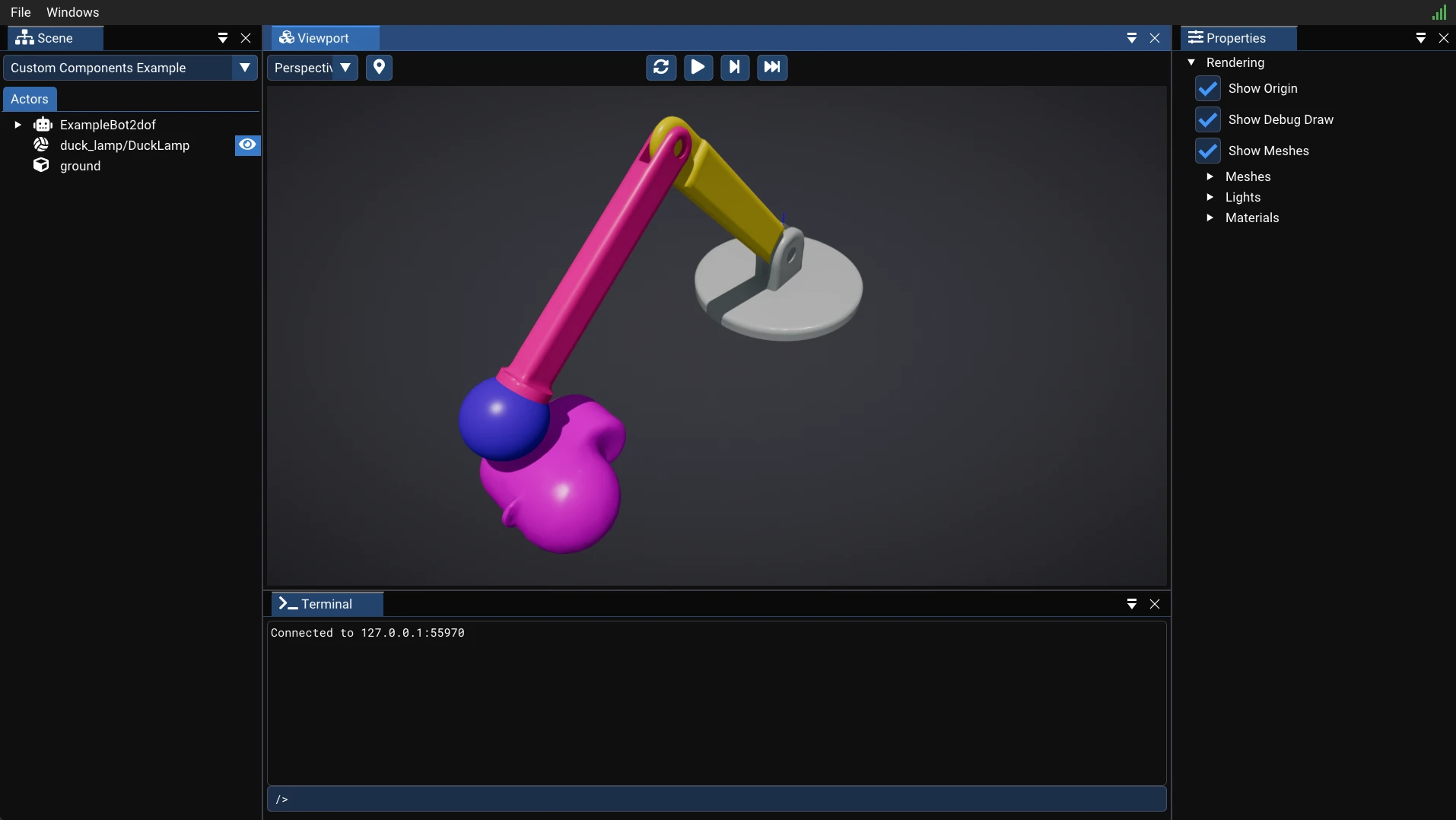
Running the custom components example opens the SuperDex Physics debugger where you can observe the simulation as it runs: